
 Photoshop
 Maya
Maya ZBrush
 Houdini
 Unreal Engine
 Substance Painter
 Blender
 Nuke
Nuke Arnold
 KeyShot
 V-Ray
V-Ray Substance Designer
 Mari
Mari Marvelous Designer
 Marmoset Toolbag
 3ds Max
 3DCoat
 Redshift
 After Effects
 Faceform Wrap
 Lightroom
 OctaneRender
 SpeedTree
 Daz 3D
 Agisoft Metashape
 Fusion
 Modo
Modo RealityCapture
 Gaea
Gaea Cinema 4D
 Gravity Sketch
 Premiere
 Procreate
 Substance 3D Modeler
 Katana
 Mudbox
 Krita
Krita World Creator
 Yeti
Yeti Ziva VFX
 SketchBook
 Quixel DDO
 Mixamo
 Natron
 Quixel Bridge
 Quixel Megascans
 Adobe Medium
 Quixel Mixer
 SynthEyes
 Clip Studio Paint
 SketchUp
 Unity
Unity Gaffer
 Massive
 Materialize
 Ornatrix
 PreForm
 Corel Painter
 Moi 3D
 QuickTime
 Storyboard Pro
 TreeIt
 animBot
 ReCap
ReCap Meshmixer
 DaVinci Resolve
 World Machine
 xNormal






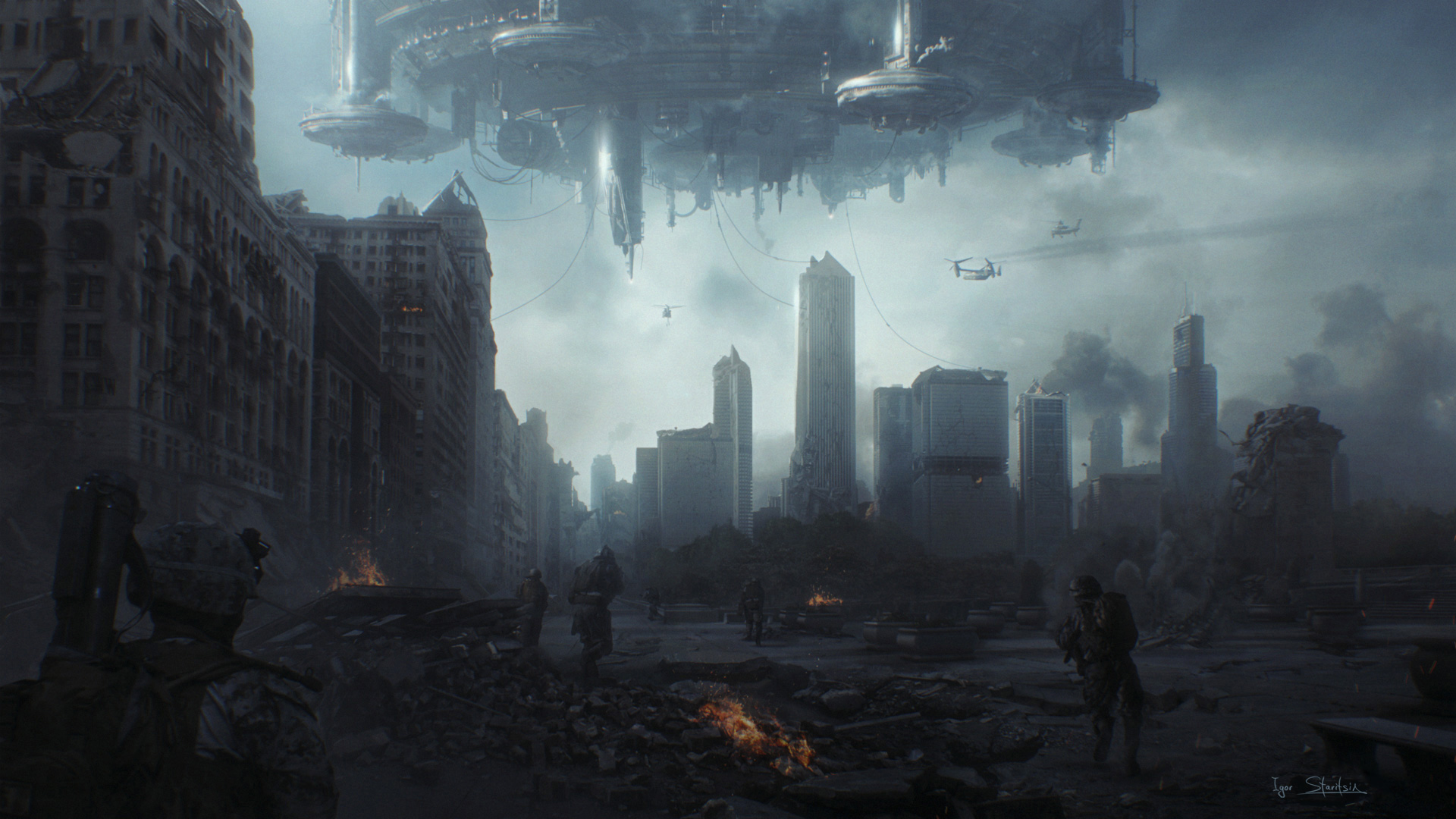


Industrial Light & Magic Art Director Igor Staritsin covers essential and advanced Photoshop techniques that professional concept artists and matte painters use daily in the film and visual effects industry. Topics include image extraction, blending modes, color correction, photo integration, and the core compositing workflows required to build believable, production-ready environments.
In this 3.5-hour workshop, Igor explores how to maintain visual consistency across complex scenes, manage light and atmospheric depth, and efficiently organize layers for large-scale matte painting projects. Throughout the process, he demonstrates how to use industry-standard tools, primarily Photoshop and Maya, to build a workflow that reflects real production environments.
Once the fundamentals are established, Igor shows how to apply them in a practical, production-style exercise by creating a destroyed city matte painting from start to finish. Starting with a clean plate, he details how to progressively build a full set extension, design and integrate realistic destruction, and refine every detail to achieve a cohesive, cinematic result. He emphasizes storytelling through environment design, ensuring that every element contributes to a convincing sense of scale, history, and mood.
In the final stage, he teaches how to elevate the matte painting into a cinematic concept keyframe by integrating characters and 3D elements created and assembled in Maya. This step focuses on camera framing, focal hierarchy, and narrative impact, ultimately transforming the piece into a compelling image that communicates the look and atmosphere of a potential film shot.
Igor’s workshop is uniquely built directly on years of professional production experience in the film and VFX industry. Every technique and workflow he demonstrates is grounded in real-world practice and delivered using industry-standard tools and methods. His goal is not only to teach software skills, but to clearly explain how professional matte paintings are created under real studio conditions, closely mirroring the expectations and pipeline of a working concept artist or matte painter.
11 Lessons
Igor Staritsin begins his workshop by analyzing photography. He explains how to study photographic references with a trained artistic eye. He teaches how to break down composition, lighting, color, atmosphere, and focal hierarchy to understand what makes an image effective. This opening lesson helps artists extract valuable visual information to create believable environments in concept art.
Duration: 14m 37s

In this second lesson, Igor explores the difference in tonal depth and color precision between bit depths in Photoshop. Artists will learn how 16-bit images preserve smoother gradients and reduce banding, while 8-bit files are more limited but standard for delivery. This lesson will help artists make informed technical workflow decisions.
Duration: 5m 44s

In this lesson, Igor demonstrates professional methods for isolating elements from images with precision and control. Artists will learn how to use selection tools, masks, and channels to cleanly separate subjects from backgrounds. These techniques are essential for integrating assets seamlessly into complex matte painting and concept workflows.
Duration: 23m 55s

This lesson brings together essential Photoshop tools and workflows for professional matte painting and concept art. Artists will learn how to isolate and mask complex elements, control blending modes, refine color and lighting, and customize brushes for natural painting. Igor focuses on developing efficient, flexible workflows that let artists integrate imagery seamlessly while maintaining realism, depth, and visual consistency.
Duration: 39m 40s

In this lesson, Igor focuses on preparing and cleaning photographic plates for professional matte painting workflows. Artists will learn how to remove unwanted elements, repair textures, and rebuild missing areas to create a neutral base image. This clean plate will become the foundation for the following environment extensions and visual effects integration lessons.
Duration: 26m 10s

In this lesson, Igor explores how to expand existing photographic environments beyond their original frame. Artists will learn how to extend landscapes, architecture, and atmosphere using painting, compositing, and photo integration techniques. Igor focuses on creating seamless, believable additions that maintain perspective, lighting, and visual continuity.
Duration: 14m 8s

In this lesson, Igor shows how to construct a cinematic destroyed urban environment from the ground up. Artists will learn to establish composition, perspective, and large-scale structural layout using a clean plate as a base. At this stage, Igor focuses on blocking in major forms, defining destruction patterns, and setting the overall mood and narrative direction for the final matte painting.
Duration: 17m 28s

In this second part of the matte painting workflow, Igor continues refining the urban destruction environment by adding detail, texture, and atmospheric depth. Artists will learn to integrate debris, enhance lighting and shadow consistency, and improve material realism. This lesson emphasizes polishing the composition, strengthening storytelling elements, and bringing the matte painting closer to a final cinematic quality.
Duration: 19m 11s

In the final part of the matte painting workflow, Igor shows how to finalize the cinematic environment by refining all remaining details and enhancing overall polish. Artists will learn to focus on advanced compositing adjustments, atmospheric effects, global color grading, and final element integration. This lesson emphasizes how to achieve a fully cohesive, production-ready matte painting with strong cinematic storytelling and visual impact.
Duration: 17m 36s

In Part 1 of Igor’s concept painting workflow, he shows how to reinterpret the existing matte painting as a foundation for further concept development. Artists will learn how to adapt and redesign established environments, and push the mood, storytelling, and design choices further while maintaining consistency with the original base. Igor focuses on iterative creative development and visual exploration in this lesson.
Duration: 19m 37s

In this final lesson, Igor continues refining and evolving the existing matte painting into a more advanced concept design. Artists will learn to add more detail, explore alternative design decisions, and enhance storytelling, atmosphere, and composition. Igor focuses on finalizing, refining, and creatively expanding the original visual foundation. He finishes by integrating the character and 3D into the painting.
Duration: 18m 53s

Primary tools
For this workshop you’ll need:
Skills Covered
Who’s this Workshop for?
This workshop is designed for aspiring and intermediate concept artists, matte painters, environment artists, and illustrators who want to develop production-ready skills for the film and visual effects industry. It’s ideal for artists with a basic understanding of Photoshop who want to learn professional workflows used in feature films.
Artists will gain practical experience creating cinematic environments, integrating photographic and 3D elements, and producing portfolio-quality artwork that reflects real studio expectations. Whether your goal is to pursue a career in concept art, matte painting, or visual development, this workshop will provide a solid foundation in the techniques and workflows commonly used in today's film and VFX production.
Learning Outcomes
By completing this workshop, artists will have developed a practical workflow for creating cinematic environments using techniques that reflect real studio expectations.
Key skills include:
- How to use essential and advanced Photoshop techniques for professional concept art and matte painting workflows.
- How to master image extraction, blending modes, color correction, and photo integration for believable environment creation.
- How to develop production-ready compositing workflows used in film and visual effects studios for complex scenes.
- How to practice maintaining visual consistency, atmospheric depth, and lighting cohesion across large-scale environment paintings.
- How to create a destroyed city matte painting from scratch, starting with a clean plate and structured approach.
- How to build a full set extension with realistic destruction and detailed environmental storytelling elements.
- How to transform matte paintings into cinematic keyframes by integrating characters and 3D elements effectively.
- How to improve composition skills through camera framing, focal hierarchy, and cinematic storytelling techniques.
- How to simulate a real production pipeline experience similar to working as a concept artist or matte painter in VFX.


